Appearance
Shopify App
NOTE
Visit the Shopify app store to install our app. https://apps.shopify.com/authentified
Settings
The best place to start on your Authentified journey is to update your settings.
Metafield definition map
This map allows you to connect important product information from your own products, to our standard list of metafields. Once connected, the information will flow through to your customers' Authentified listings, ensuring high quality listings that give consumers the information they need to make informed decisions.
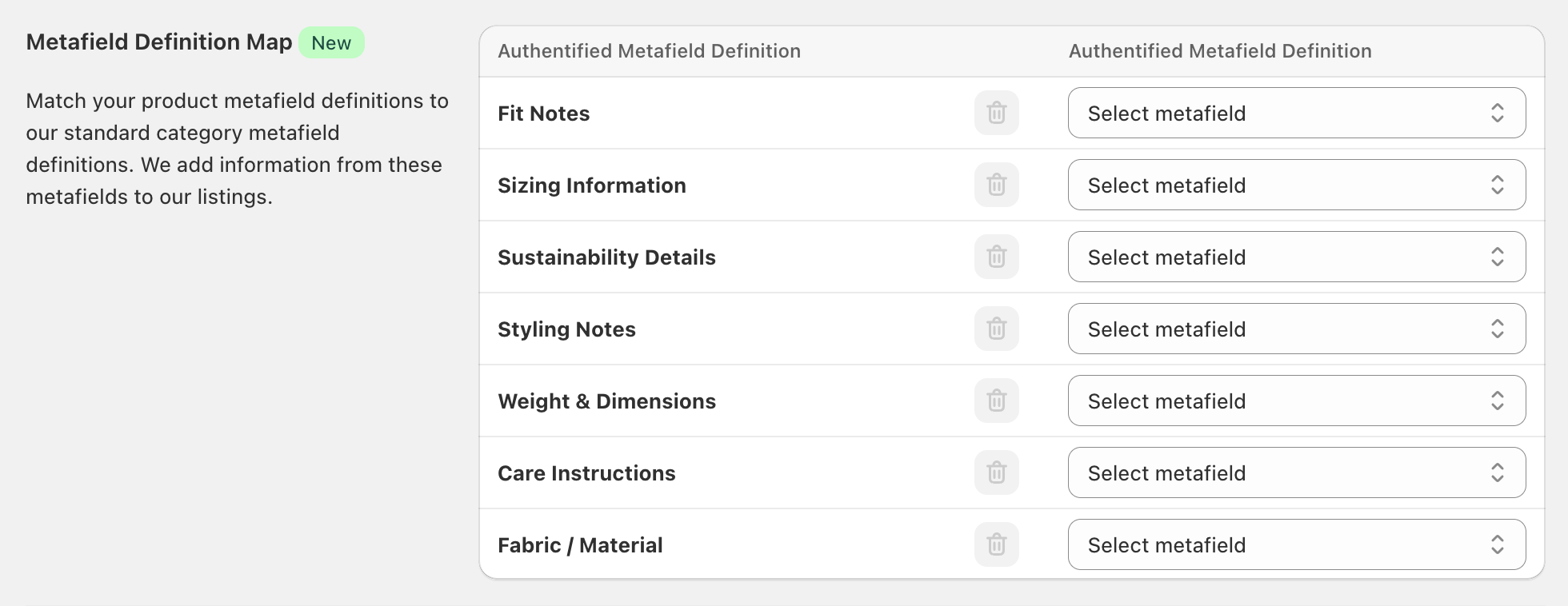
If there's a category you think you are missing or would like to see in our standard set, let us know via our Canny site.
Ignored products
You may want to protect your brand by excluding certain products from resale. Items such as intimate apparel, gift cards, or low-value items such as accessories maybe shouldn't make their way on to the second-hand market. If you use tags to categorise certain products, you can just add those tags to the ignore products field.
We recommend applying a tag such as noresale or not-for-resale to easily identify which products cannot be resold via Authentified.

Primary contact
This is just for our records in case we need to contact you!

Outlet
In addition to seconds and samples, Authentified can serve as an outlet channel for your excess inventory — automating the process of listing, managing, and reselling it through secondary marketplaces like eBay and Depop.
Whether you want to temporarily or permanently reduce discount stock in your primary channels, or simply add capacity by selling simultaneously through secondary markets, the outlet channel can help — with minimal cannibalisation of your primary sales and margin.
Setup
The outlet channel is configured from the Authentified app in your Shopify store.
Step 1: Enable Outlet
Check the Enable Outlet checkbox to get started.
Step 2: Tag your products
Tag the products you want to sell through the outlet channel. You can use an existing tag, or create a new one — for example authentified:outlet. The tag can be whatever suits your business.
WARNING
Try to keep the tag narrowed to stock you actually want in the outlet channel so we're not syncing any unnecessary products.
Step 3: Choose your shipping approach
By default, you fulfil outlet orders yourself and Authentified passes the full postage cost back to you (see Orders and fulfilment).
If you'd rather Authentified handle shipping, turn on Managed shipping. When enabled, Authentified generates the shipping label for each outlet order and attaches it directly to the Shopify order — you won't need to fulfil these orders yourself.
WARNING
Enabling managed shipping changes your order totals, since Authentified no longer passes the shipping cost back to you.
Step 4: Select a location
Choose the location(s) you want to sell outlet inventory from — for example your warehouse, or a location set up specifically for outlet stock.
For each location you add, you can also add email addresses to notify whenever an outlet order comes through for that location.
Step 5: Set your pricing strategy
By default, outlet listings use your product's current price as the starting price. You can mark this up by a percentage if you'd like (for example, 20%).
If you mark up the starting price, we recommend setting an equivalent maximum discount, so the fully discounted listing price still matches your current sale price. The maximum discount defaults to 20%.
Step 6: Set a stock buffer
We recommend setting a stock buffer of at least 1 if you're continuing to sell through your primary channels.
Once configured, Authentified begins listing outlet products on secondary channels. We list a limited number of new listings each day, always in quantities of 1, to avoid flooding the secondary markets. Listings happen at the variant level, so there's only ever one listing per variant carrying the outlet tag — the maximum number of listings we can create is your total tagged products multiplied by their variants.
Orders and fulfilment
When an item sells through one of our secondary channels, we create an order in your Shopify store as soon as it's fully paid. The order includes the sold price, Authentified's commission, shipping cost, and taxes.
NOTE
If you've enabled Managed shipping, Authentified generates and attaches the shipping label for you — skip to Returns below, as the rest of this section covers self-fulfilled orders. If you haven't enabled managed shipping, we pass the full shipping cost back to you.
WARNING
The order will be assigned to a single customer ("Authentified Outlet"), but each order will have a different shipping address and contact person.
Fulfil and manifest the order as you normally would, so a tracking number is added to each fulfilment. As soon as a tracking number is added, Authentified passes it on to the buyer so they can track their order.
Shipping label details
As Authentified is the merchant of record for outlet sales, please configure your shipping software to use the following From/Sender address on shipping labels:
Authentified C/o Creative Cubes Level 5, 111 Cecil St South Melbourne Victoria 3205
This lets Authentified handle any returns directly, reducing the load on your customer service and warehouse teams.
Returns
Because Authentified is the merchant of record, the sale is considered settled as soon as the item is posted. If a buyer wants to return the item, it's returned to Authentified — there's no recourse back to you.
Cancelled orders
Unless an order has already been dispatched, any order we cancel is also cancelled in your store. If an order is cancelled after it's dispatched, resolving it becomes Authentified's responsibility.
NOTE
If you use an ERP like AP21 or NetSuite to manage orders, you may need to set up a new payment gateway or payment type before orders will flow through. All Authentified outlet orders use the payment gateway Authentified.
Inventory deduction and replenishing
Orders automatically decrement inventory once fulfilled. If the inventory available at the specified location for a sold variant still exceeds your stock buffer, Authentified creates another listing for that variant within 1–3 days.
Authentified commission
Your commission is calculated at 13.5% of the total order value.
NOTE
If you've not enabled Managed shipping, Authentified passes through the postage cost and adds it to your payout.